Tool to create, customize and download or print barcode images (EAN-13, Code 128, Code 39, etc.) with various settings and automatic checksum calculation.
Barcode Generator - dCode
Tag(s) : Image Processing, Character Encoding

dCode is free and its tools are a valuable help in games, maths, geocaching, puzzles and problems to solve every day!
A suggestion ? a feedback ? a bug ? an idea ? Write to dCode!
Barcode Generator
Barcodes Decoder
Answers to Questions (FAQ)
What is a barcode? (Definition)
A barcode is a standardized graphic symbol composed of vertical bars and spaces of defined widths. These patterns are interpreted by a machine as a sequence of numerical values according to a given symbology (for example, EAN-13, Code 128, or Code 39).
Structurally, a linear barcode generally consists of: a blank area (white margin), a starting pattern, the encoded data, a checksum to detect reading errors, then a finishing pattern, and another blank area. The contrast between dark bars and light spaces is what allows the reader to convert the image into a usable digital signal.
How to decrypt a barcode?
To decode a barcode, the user can use a dedicated here (affiliate link) laser scanner or a smartphone with a barcode scanning app.
Technically, the scanner scans the symbol and measures its reflectance: dark bars reflect less light than light areas. This analog signal is digitized and then segmented into modules whose widths are compared to a lookup table specific to the symbology used. A checksum calculation then verifies the integrity of the read data.
Example: 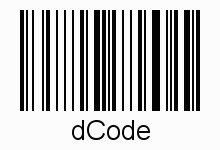
dCode offers pages for each of the most common barcodes (2D or 3D) (QR-Code, Code 128, Code 39, Code 93, EAN, EAN13, etc.)
How to create/generate a barcode?
Indicate the content to be coded and the type of bar code standard.
The dCode generator only follow the instructions of each barcode norm.
How to display a text label under the barcode?
Most barcodes are accompanied by human-readable text called HRI (Human Readable Interpretation), which usually repeats the encoded value.
dCode allows the user to display a different value if needed.
How to get the country of a product using its barcode?
For an EAN-13 code, the first three digits constitute the GS1 prefix, which identifies the country (or region) of the organization that assigned the number to the manufacturer. Note: this is not necessarily the country of production of the product.
Here are the first digits for the most often international barcodes:
Example: '000 to 019', '030 to 039' and '060 to 139' for United States
Example: '500 to 509' for United Kingdom
Example: '690 to 699' for China and 489 for Hong Kong
Source code
dCode retains ownership of the "Barcode Generator" source code. Any algorithm for the "Barcode Generator" algorithm, applet or snippet or script (converter, solver, encryption / decryption, encoding / decoding, ciphering / deciphering, breaker, translator), or any "Barcode Generator" functions (calculate, convert, solve, decrypt / encrypt, decipher / cipher, decode / encode, translate) written in any informatic language (Python, Java, PHP, C#, Javascript, Matlab, etc.) or any database download or API access for "Barcode Generator" or any other element are not public (except explicit open source licence). Same with the download for offline use on PC, mobile, tablet, iPhone or Android app.
Reminder: dCode is an educational and teaching resource, accessible online for free and for everyone.
Cite dCode
The content of the page "Barcode Generator" and its results may be freely copied and reused, including for commercial purposes, provided that dCode.fr is cited as the source (Creative Commons CC-BY free distribution license).
Exporting the results is free and can be done simply by clicking on the export icons ⤓ (.csv or .txt format) or ⧉ (copy and paste).
To cite dCode.fr on another website, use the link:
In a scientific article or book, the recommended bibliographic citation is: Barcode Generator on dCode.fr [online website], retrieved on 2026-10-02,